How to Choose a Minecraft Multiplayer Server: Survival, PvP and Peaceful Building
A practical decision guide to picking a Minecraft server that fits how you play — survival, competitive PvP or calm building.
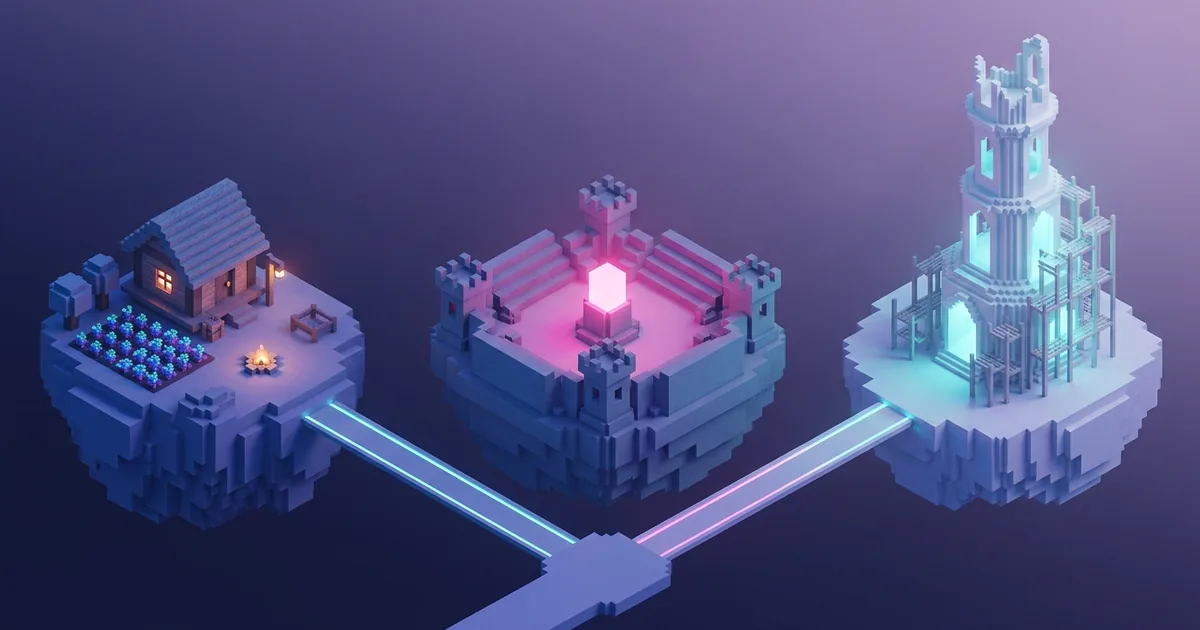
Picking a multiplayer server is a bigger decision than it looks. The server you join decides how you spend every session: whether you guard a base at night, queue for ranked fights or spend a whole weekend finishing a tower. This guide skips the basics of typing in an address. Instead, it helps you work out which kind of server suits the way you like to play, and how to check a server before you put hours into it.
What makes a good multiplayer server
A good server is not just the one with the biggest player count. It is the one where the rules, the pace and the people match what you came for. Before you look at any list, answer three quick questions:
- Do you want risk? Some players enjoy losing loot to another player. Others log off for good the first time it happens.
- Do you want goals? Ranks, quests and tournaments give structure. Open worlds leave the goals to you.
- Do you want company or calm? A packed spawn is great for trading and terrible for quiet building.
Most servers lean towards one of three formats: survival, competitive PvP or peaceful building. A useful public example is MinecraftsGame, which runs three separate worlds, one for each of those styles, under one account. Comparing the three side by side shows how much the same game changes when only the rules change. MinecraftSide is independent and has no connection to that project. Everything we mention about it comes from its public pages as of November 2026.
Survival gameplay and progression
Survival servers keep the core loop you know from single player. You gather, craft, build a base and slowly upgrade your gear, but you share the world with other players. The appeal is a world that keeps going while you are away and neighbours you can trade with or team up with.
On survival servers, what matters most is how progression is protected. Ask whether bases can be claimed, whether PvP is allowed and whether explosives are restricted. MinecraftsGame's LuckySurvival is a good reference point. Its server page lists survival on, PvP on and TNT off, at Normal difficulty. It describes the world as classic survival with fair PvP, a balanced economy, guilds and alliances. Short descriptions on a homepage can be blunter than the detailed page, so read the full server page and the in-game rules before you settle in.
Survival is the safest first pick if you already enjoy single-player survival and want the same game with people around. If you need a refresher on base layout first, our starter base guide covers the essentials.
Competitive PvP and faction-style servers
PvP and faction servers turn other players into the main challenge. Expect raids, alliances, territory fights and, often, a ranking system. They reward practice, quick reactions and good teamwork. They also punish you for logging off with a full inventory in an exposed base.
MinecraftsGame's MineWars shows the format clearly. Its listing describes vanilla survival with PvP and TNT enabled on Hard difficulty. The server page adds a ranked ladder, team-based faction combat, territory control and tournaments with prizes. It also says the economy "revolves around conquest", so looting and holding land is the point, not a side effect.
Choose this style if losing a fight makes you want a rematch, not a break. If you are new to PvP, look for servers that separate arenas from the open world, so you can practise without risking your whole base.
Peaceful building and cooperative play
Peaceful servers remove the stress of combat between players so you can focus on builds, exploration and community projects. They suit builders, younger players, families and anyone who plays to relax.
CalmSky, the third MinecraftsGame world, is listed as a peaceful server with no PvP or TNT, on Easy difficulty. Its page describes it as having no griefing, plus creative building with WorldEdit tools, community plots you can claim, and regular build contests. That combination is typical of a good builder server. You get a protected space of your own, tools that speed up large projects and events that give your builds an audience.
The key questions here are about protection and tools. Can you claim land? Can friends be added to your plot? Are building tools like WorldEdit available to everyone, or only to certain ranks?
Rules, griefing and moderation
Rules are what separate a fun server from a frustrating one. Griefing means wrecking or stealing from someone else's build. On a PvP server it may be part of the game, but on a peaceful one it is a bannable offence. Always read the rules before you join, usually through a /rules command, a spawn board or the server's website.
Good moderation shows up in small ways: staff who answer in chat, a clear way to report players, and rules that are actually enforced. Mojang's own Minecraft Community Standards are a useful baseline. A server whose rules go further than that is usually a sign that someone is paying attention.
Parents should also note what the official Minecraft servers page says: child accounts have online multiplayer turned off by default. Players under 13 cannot join servers unless a parent changes the account settings.
Server economies and progression systems
Many servers add an economy on top of vanilla play: shops, player trading, ranks and sometimes paid extras. An economy can make a world feel alive, but check two things before you commit:
- What can be bought with real money? Cosmetics are harmless. Items or ranks that give real combat or building advantages change how fair the server is.
- What can be earned in game? A healthy economy lets active players progress without paying.
MinecraftsGame publicly separates two currencies. Crystals are bought in its store and spent on rare resources and special items. Dollars are earned in play and used for trading with other players. The site also states that it is not pay-to-win and that cosmetics give no gameplay advantage. Whatever server you pick, read the store page with the same care you give the rules. It tells you a lot about how the server makes progress feel. Our guide on Minecraft and server costs covers the money side in more detail.
Version compatibility
Edition and version matter before anything else. Java Edition and Bedrock Edition are different games under the hood. A server built for one does not automatically accept the other, and Java servers often support only a range of game versions.
Check the server's supported versions against the game you actually run. For example, MinecraftsGame lists Java 1.12.2 to 1.19 and says it supports the latest Bedrock release. If your launcher is set to a newer or older Java version than the range a server lists, switch profiles before you blame the server. Console players should read our walkthrough on adding a server on Xbox, because Bedrock on console handles servers differently. The official Minecraft servers page also explains the Servers tab for featured servers and the Add server button for joining others.
Connection stability and player experience
A world you love is no fun if it keeps dropping you. Stability depends on the server's hardware and location, and on your own connection. You cannot see a server's hardware, but you can watch for warning signs during a test session:
- blocks that reappear after you break them, or mobs that jump around;
- long pauses when many players are online at once;
- frequent restarts with no notice in chat or on the website.
Treat uptime claims on a server's own site as a promise, not a measurement. Your own experience over a few evenings is the real test. If you cannot connect at all, start with our unknown host error guide before you rule a server out.
Community size and activity
Bigger is not always better. A huge server has full markets and constant events, but you can be just another name. A smaller one can feel like a village where people know your build. What matters more than size is activity: whether people are actually playing, building and talking at the times you play.
Join at your usual hour and look around spawn. Recent builds, an active chat and staff who reply are better signs than any headline number. Check how the community talks to newcomers, too. A friendly reply to a simple question says a lot about the next six months.
How to compare servers before joining
Put two or three candidates side by side and compare the same points for each: game mode, PvP and TNT rules, difficulty, land protection, economy, supported versions and target audience. A server hub that lays this out clearly makes the job easy. The MinecraftsGame servers page is a tidy example of that layout. It shows survival, PvP and peaceful building next to each other, with mode switches, difficulty, a feature list and a stated target audience for each world, so you can see the differences before you connect.
When a server does not lay things out this clearly, build the comparison yourself. Then play a short trial session on each candidate: an hour or two, no big projects, just getting a feel for the rules, the lag and the people. Only then start your real base.
Checklist for choosing your first server
- Pick your style first: survival, PvP/factions or peaceful building.
- Match your edition and version to the range the server lists.
- Read the rules, especially on PvP, TNT, griefing and land claims.
- Check the store and decide whether paid items affect fairness.
- Look for active moderation and a clear way to report problems.
- Test the connection over a few sessions at your usual play time.
- Judge activity, not size: recent builds and a friendly chat count most.
- Start small, and only build big once the server has earned your time.
Pick the server that fits the way you play, not the one with the loudest trailer, and keep a backup option in mind. If a server stops being fun, moving on is a normal part of multiplayer Minecraft.
Frequently asked questions
- What type of Minecraft server is best for beginners?
- A survival or peaceful server with land claims and active moderation. You keep the familiar game loop without losing your base to other players.
- What is the difference between PvP and faction servers?
- PvP servers allow players to fight each other. Faction servers add teams, territory control and raids, so fights are tied to land and loot.
- Can I join a Java server from Bedrock Edition?
- Not automatically. Java and Bedrock are different editions, so check that the server lists support for your edition and game version.
- How do I know if a server is well moderated?
- Look for clear rules, a report option, staff who answer in chat and rules that are visibly enforced during your first sessions.
Related reading
Can You Tame a Bunny in Minecraft?
You cannot tame a Minecraft bunny, but you can lure, breed, and keep one nearby.
How Do You Get Red Sandstone in Minecraft?
Find red sandstone in Badlands or craft it from red sand, then build with its variants.
How Do You Keep Your Inventory After Death in Minecraft?
Keep your items after death with one gamerule or a world setting.